Using Conto with Stripe Link
Stripe Link has rapidly become one of the most popular channels for agentic payments, enabling personal AI agents like Instinct and Muse to shop and buy things on their users' behalf. In September, Stripe reported a 38-fold increase in agentic purchases through Link over the previous month. With significant distribution across the internet, Stripe also makes it easy for merchants to accept agentic purchases. Muse can pay at more than a million businesses that accept Link. Link also lets users approve a budget and set a per-purchase limit, so eligible purchases can proceed without approval each time. That moves us closer to the more autonomous future of agentic commerce we believe in at Conto. You shouldn't have to handhold an agent and approve every purchase. You should be able to trust it to work within the boundaries you set.
Link gives agents a way to pay, with its own spending limits and approval controls. Conto adds the buyer’s purchasing policies to that payment flow. Conto lets the buyer restrict suppliers, set category rules for each agent, apply shared company policies across agents, and decide when a human needs to review a purchase. These controls are useful for a single agent and become increasingly valuable when a team manages several agents under common policies. Your agents keep using Link to pay, while Conto checks the buyer’s rules in the connected execution path. As more agents take on purchasing, buyers need a way to manage their spending together.
Controls for agents at work
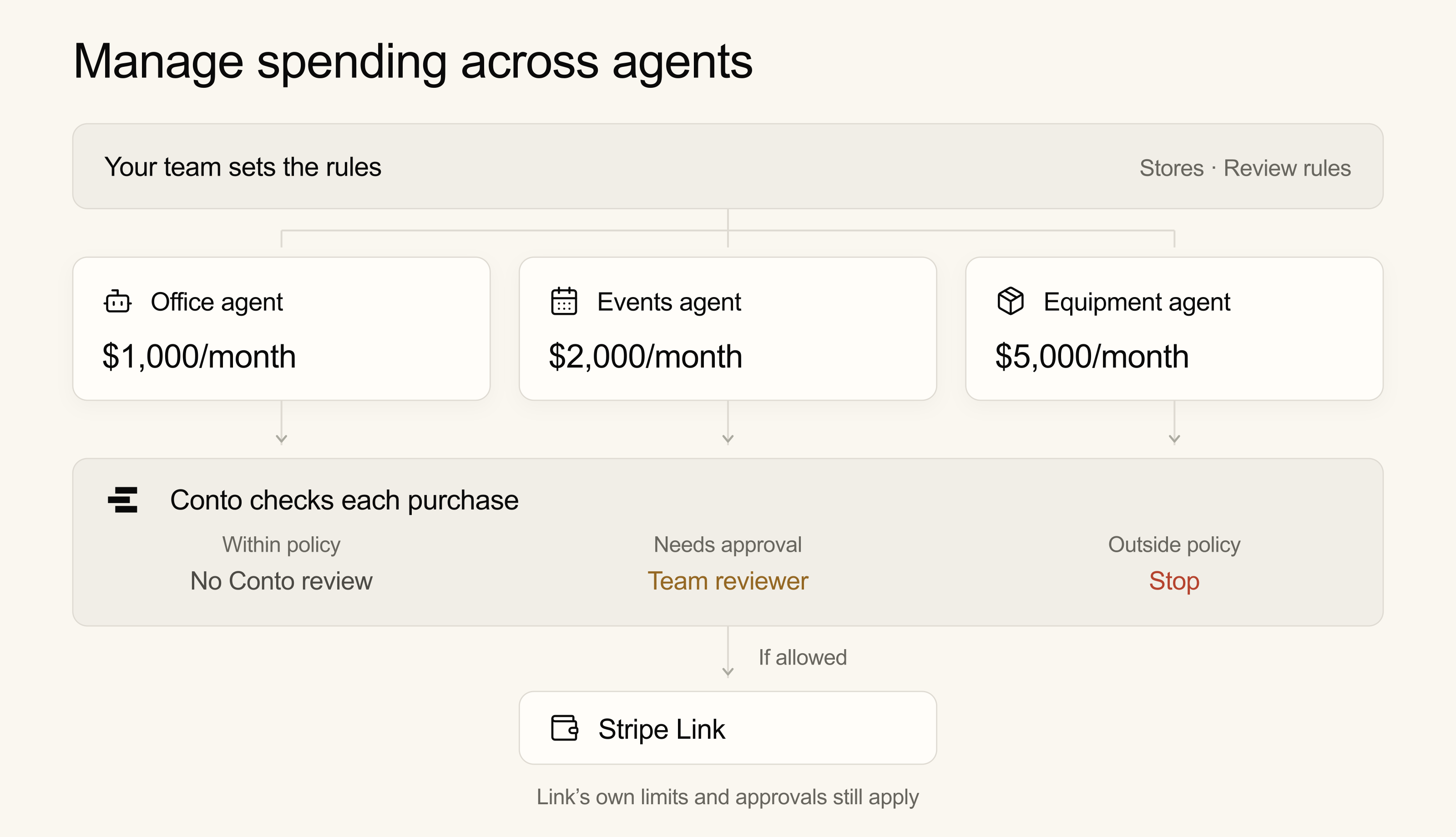
Businesses already have purchasing policies that need to apply when humans buy on their behalf: approved suppliers, different spending authority by role, and purchases that require review. Conto gives them a way to apply those policies to agents using Link. Your office agent, events agent, and equipment agent may all pay through Link, but they need different spending authority. And you need a way to track and manage it all. Conto lets a budget holder apply common company policies alongside each agent’s spend limits and store permissions. A purchase must satisfy both the organization’s rules and the agent’s restrictions before it can continue. Requests that require human review wait; requests outside policy stop.
Conto adds buyer-defined purchasing policies around the connected payment flow. Even one agent may need approved-store restrictions, category rules, or an additional review threshold. With several agents, the same policy framework lets the buyer manage different responsibilities under common rules. Conto’s guardrails complement Link.
Conto + Link: more control, more trust in your agents
Conto lets your team delegate spending across its agents, with shared oversight and individual accountability. The people funding those agents control their budgets, permissions, and review requirements.
- Agent-specific spending limits. Set per-purchase, daily, weekly, and monthly limits for each agent. Pending purchases count against the available budget.
- Shared policies. Apply company rules across agents, with tighter restrictions where needed. Every applicable policy must pass; each agent's budget remains separate.
- Approval controls. Hold purchases above a review threshold for human approval. Configure named or role-based reviewers, multiple approvals, ordered reviews, expiry, and escalation through Conto’s approval workflows.
- Supplier and category rules. Restrict suppliers and categories according to each agent’s responsibilities, using trusted checkout data.
- Visibility across agents. Review requests, decisions, and reported outcomes. Suspend an agent to stop new requests through Conto.
Conto's policies add checks to an agent's Link checkout. They don't change Link's limits or replace any approval Link requires.
Use cases
- Company purchasing. Give office, events, and equipment agents separate budgets under the same company rules. Review their spending together in Conto.
- Multi-layered approval. Route a held equipment purchase to a department manager, then finance, before continuing to Link.
- Personal assistants. Let each user pay with their Link account and set their agent’s spending rules in Conto, so routine purchases can proceed without a Conto review each time.
Why does this matter?
Your equipment agent proposes a $450 purchase from an approved retailer. Its per-purchase limit is $500, and it has enough remaining budget, but the buyer requires review for equipment purchases above $300. Conto holds the request for the required human approval before allowing the connected checkout to continue to Link. The buyer can give an office-supplies agent a different limit and review threshold while applying the same approved-store policy to both. As the agentic organization grows, so does the need for payment controls that expand beyond individual agents and basic controls.
Add Conto to your agent's checkout
The owner or budget holder sets the agent's budget, supplier restrictions, and approval rules in Conto. Your checkout uses the SDK to check purchases against Conto’s hosted policies and spending records. Purchases that pass without a review requirement continue to Link. A human steps in when a policy requires review, with the required reviewers selected by the organization’s approval workflow; denied purchases stop. Any approval Link requires still applies.
Just before payment, Conto checks the final cart again. The items and amount must match what was authorized, and the purchase must still meet the agent's spending rules.
Your application must enforce Conto's decisions in the part of checkout that controls payment. Supplier restrictions match the checkout domain. Category rules evaluate the category supplied by trusted checkout code; Conto does not independently verify a merchant’s category or classify individual products within a store. An agent with separate, unrestricted payment access can bypass these checks; independent purchases in Link are outside this flow.
Try the controls
Try Conto's Stripe Link commerce demo: an allowed purchase, a blocked request, a purchase needing approval, and a changed cart. Follow an allowed purchase into Link's sandbox and stop before paying.
Get started with your own agents
- Create a Conto account, add an agent, and set its spending rules. Apply company policies across agents and configure approval workflows where needed.
- Follow the Link checkout guide to connect Conto's checks, approvals, and outcome reporting.
- Test the four scenarios in your checkout, starting in Link's sandbox and stopping before payment.
For virtual-card checkout, use the Link card guide. Support depends on how your agent completes checkout.
If your team already uses Link, contact us and tell us how your agents pay, who owns their budgets, and which purchases need review.